Equity Holdings: Share Positions by Portfolio
Browse your stock lots in a dedicated Equity Holdings view — separate from options tables and Stock Basis.
What Equity Holdings shows
Equity Holdings is the dedicated place for share positions — quantity, average cost, market value, and unrealized P/L — without mixing them into your open options tables.
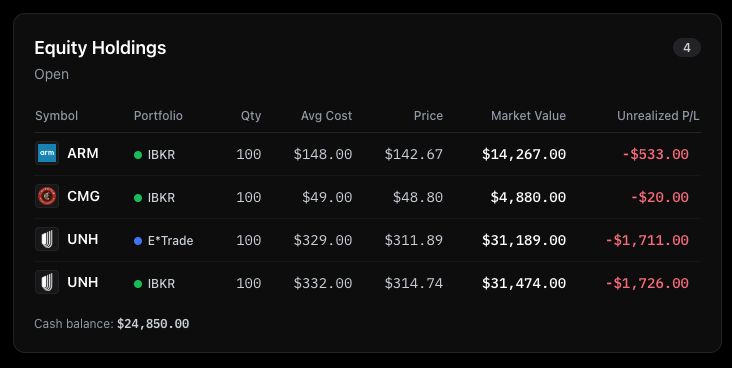
Open it from the left sidebar. The portfolio selector still applies, so you can review one account or All Portfolios.
How it relates to other screens
- Overview still shows a compact equity table on the dashboard. Equity Holdings is the full section when you want to scan lots without scrolling past options.
- Stock Basis answers "what's my true cost after premiums?" Equity Holdings answers "what shares do I hold right now?"
- Opportunities flags uncovered 100-share lots you can write calls against. Those lots come from the same equity data.
A simple workflow
- Open Equity Holdings after a broker sync to confirm share quantities look right.
- For any uncovered lot, jump to Opportunities → Find calls, or open Stock Basis if you need adjusted cost before choosing a strike.
- Use portfolio and symbol filters if you manage multiple accounts.
Broker-synced accounts pull equity from your connection; manual portfolios show shares you've logged or that resulted from assignment.
Frequently Asked Questions
Is Equity Holdings the same as Stock Basis?
No. Equity Holdings lists your share positions (quantity, cost, market value). Stock Basis focuses on adjusted cost per share after option premiums — the key wheel metric for break-even.
Where do uncovered lots show up for covered calls?
Opportunities highlights uncovered 100-share lots with Find calls. Equity Holdings is where you review the full share book; Opportunities is where you act on idle shares.
Do I need a brokerage connection to see equity?
Broker sync imports equity automatically. Manual portfolios show shares from assignments or positions you've added. You can explore the sample portfolio without signing in.