Weekly Email Review: Sunday Digest for Your Wheel
Opt in to a Sunday email that summarizes open positions, expirations, and closed legs — with a preview from the Trade Tracker sidebar.
What the weekly email is
Every Sunday evening (about 6:30 PM ET), Wheel Strategy Options can email a short review of your Trade Tracker: open positions, trades approaching expiration, and legs you closed during the week.
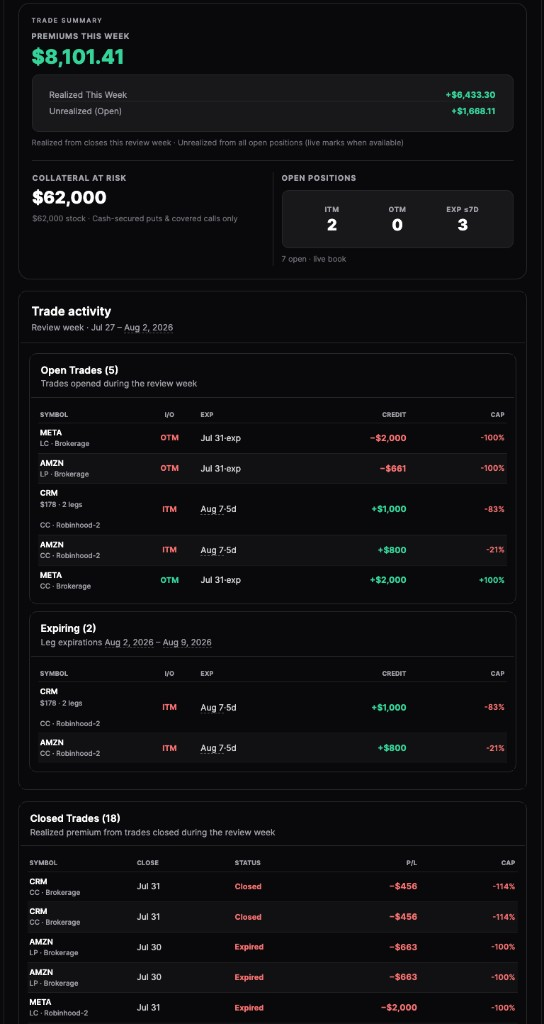
It's meant to replace a Sunday spreadsheet check — not to replace the live tracker.
How to opt in
- Open the Trade Tracker while signed in.
- In the sidebar, choose Get weekly emails (or Manage weekly emails if you're already subscribed).
- Preview the email on desktop or mobile, then confirm opt-in.
Delivery uses your account email. You can unsubscribe anytime from the same manage dialog.
What you'll see in the email
- Open trades worth a look (excluding stale expired legs from the open list).
- Expiring soon positions for the coming week.
- Closed legs from the review window.
- Broker nicknames so multi-account books stay readable on a phone.
If the week was quiet, the digest falls back to a year-to-date snapshot so the email still has useful context instead of an empty shell.
Tips
- Preview before you subscribe so you know exactly what Sunday will look like.
- Keep broker nicknames and portfolio colors up to date — they carry into the email.
- Use Opportunities during the week; use the digest as your weekend recap.
Frequently Asked Questions
When is the weekly digest sent?
Every Sunday around 6:30 PM Eastern Time to the email on your account, if you've opted in.
What if I had no trades this week?
Quiet weeks fall back to a year-to-date summary so the email still shows useful portfolio context instead of looking empty.
How do I unsubscribe?
Open the Trade Tracker sidebar → Manage weekly emails → Unsubscribe. You can opt back in later from the same place.