Opportunities: Trades That Need Attention
Review ITM legs and all open shorts by expiration, plus deployable capital for CSPs and uncovered shares for covered calls.
Your weekly action list
The Opportunities screen turns your portfolio into a to-do list. It has two halves: trades that need attention, and capital you could put to work.
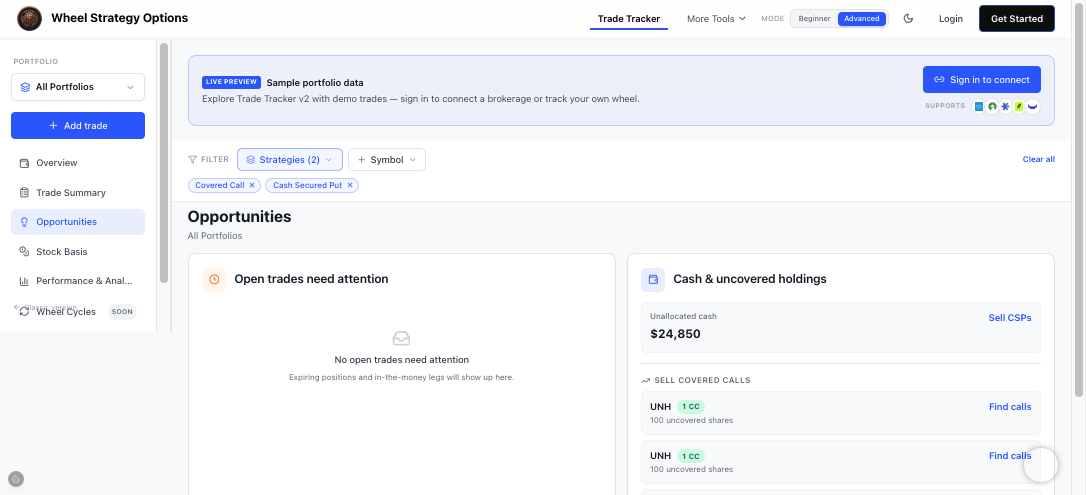
Open trades need attention
The left panel has two stacks:
- ITM positions first — short legs that are in the money and at risk of assignment or being called away.
- Open trades — every open short wheel leg, sorted by expiration (nearest first). The list scrolls when you have many positions so the page stays compact.
When you have no open shorts, it says so, so you never have to hunt through tables to feel confident.
Position Management Guidance
Below the attention panels, Position Management Guidance suggests Hold, Close, or Roll for each open short covered call or cash-secured put:
- Roll (red) when the leg is ITM or ATM — avoid assignment or call-away. Find a roll opens the standalone Roll Finder for that trade.
- Close (green) when you have captured about 70%+ of the premium — lock in profit and free capital. Broker-synced legs show the suggestion without an in-app Close button (close at your broker).
- Hold (yellow) when the short is still OTM and theta has room to work.
The same card also appears on the Dashboard above dividends. Color-coded rows show the reason plus moneyness, DTE, and premium captured %.
Tap Find a roll on a flagged leg in Opportunities (or from Position Management Guidance) to open the standalone Roll Finder in a new tab for that trade. Roll Finder lists the same adjusted cost basis per share as Cost Basis for that ticker — not the option strike — so you can compare roll strikes to the stock you already track. Use the Conservative / Balanced / Aggressive chips to lean farther OTM, stay middle-ground, or include closer strikes and same-strike roll-outs. The strike × expiry heatmap and ranked rows show push-out days, estimated credit or debit for your full contract count, and annualized yield. Destinations with no volume or no trade today show a warning icon — hover for Vol, OI, last trade age, BTC, and STO. Optionally turn on Approx STO from adjacent strikes to estimate thin quotes from nearby same-expiry contracts. You can also open /roll-finder directly to pick any eligible journal short or enter a contract manually.
Signed-out visitors on /roll-finder see labeled Demo sample shorts and a sample strike × expiry heatmap so they can explore the layout before signing in. Sign in to use your Trade Tracker journal; Pro unlocks the full live matrix.
Capital and uncovered holdings
The right column splits Capital and Uncovered holdings:
- Capital — deployable dollars for new cash-secured puts: positive cash minus collateral reserved by open short puts (strike × contracts × 100), allocated per account so one account’s CSP does not eat another account’s cash. If CSP collateral is reserved, the card shows Available cash = Cash − CSP reserved. Broker margin buying power is ignored here — it is securities-backed capacity, not cash for CSPs. Margin used (if any) is a note only — deficits are not added to available capital. Sell CSPs opens the cash-secured put screener with a max-price filter seeded from that deployable amount.
- Uncovered holdings — 100-share lots you own but haven’t written calls against. Each row labels adjusted cost basis and, when available, broker average cost side by side so you can compare suggested CC strikes to both numbers. Click Find calls to open the covered call screener for that ticker. Use Exclude from wheel on core buy-and-hold names (for example VTI, BND, VXUS) to mute covered-call ideas; restore them anytime from the excluded chips.
Position Management Guidance close targets default to 70% premium captured. Open the CSP · CC settings chip on the guidance card to edit CSP and CC percentages separately, then Save (stored on your account).
This is the bridge between tracking and trading: the tracker shows what’s idle, and the screener finds the next contract.
A simple weekly routine
- Clear ITM legs first, then scan Open trades by expiration (roll, close, or let expire).
- Deploy Capital → Available cash into new CSPs if you have a thesis.
- Write covered calls on any uncovered lots to keep the wheel turning.
Frequently Asked Questions
What is Position Management Guidance?
On Dashboard and Opportunities, Position Management Guidance suggests Hold, Close, or Roll for open short covered calls and cash-secured puts using moneyness, premium captured, and DTE. Close targets default to 70%. Open the CSP · CC settings chip to set separate percentages and Save. Find a roll opens the standalone Roll Finder.
How do I stop covered-call ideas on ETFs I don't wheel?
On Opportunities → Uncovered holdings, click Exclude from wheel on that ticker. It disappears from uncovered holdings and Similar contracts covered-call ideas. Use the Excluded from wheel ideas chips to restore it.
Why do uncovered holdings show adjusted and broker cost?
Adjusted basis nets wheel premiums into stock cost. Broker cost is your brokerage average (for example Fidelity via SnapTrade). Showing both helps you avoid writing covered calls below your broker cost when adjusted basis is lower.
What shows up under Open trades need attention?
ITM short legs appear first. Below that, Open trades lists every open short wheel position sorted by expiration so you can scan nearest expiries without leaving Opportunities.
How is Available cash calculated?
Available cash is positive cash minus open short put collateral (strike × contracts × 100) per account. Broker margin buying power is not used — it overstates cash for CSPs. Margin used on deficit accounts is shown for context and is not added to Available cash. Sell CSPs seeds the CSP screener max price from that deployable amount.
What does Find a roll do?
It opens the standalone Roll Finder in a new tab for that open covered call or cash-secured put. The page lists the same adjusted cost basis per share as Cost Basis for that ticker. Switch Conservative, Balanced, or Aggressive risk profiles, browse the strike × expiry heatmap, and see estimated credit or debit for your contract count. Thin quotes show a warning on hover with Vol, OI, and last trade age; you can approx STO from adjacent strikes.
Why do some Roll Finder cells show a warning?
A warning means that destination has no volume and/or has not traded today. Hover for Vol, OI, last trade age, BTC (close ask), and STO. Turn on Approx STO from adjacent strikes under moneyness to estimate credit from neighboring same-expiry strikes that did trade.
Can I try Roll Finder without signing in?
Yes. Open /roll-finder while signed out to explore Demo sample positions and a sample heatmap. Sign in to load your Trade Tracker shorts; Pro unlocks the full live matrix.