Trade Tracker Tutorial: A Complete Beginner Tour
See what the new Trade Tracker does, how the sidebar is organized, and the fastest way to start tracking your wheel.
What is the Trade Tracker?
The Trade Tracker is a purpose-built journal and dashboard for the wheel strategy. Instead of wrestling with a spreadsheet, it automatically calculates your premium income, adjusted cost basis, assignment rates, and annualized returns — and it shows you which open positions need attention today.
It works two ways:
- Manual — type in each covered call or cash-secured put yourself.
- Automatic — connect a brokerage and let trades sync in on their own.
Everything below uses the built-in sample portfolio, so you can follow along at the Trade Tracker even before you add a single trade.
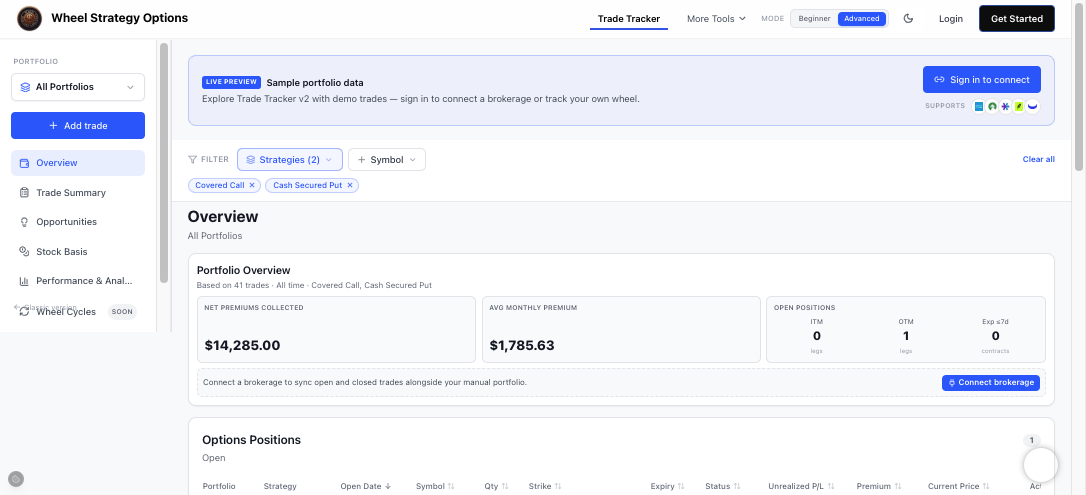
The layout at a glance
Every screen shares the same frame:
| Area | Where | What it does |
|---|---|---|
| Portfolio selector | Top of the sidebar | Switch between "All Portfolios" and individual accounts |
| Add trade | Below the selector | Log a covered call or cash-secured put manually |
| Section nav | Left sidebar | Jump between Overview, Opportunities, Performance, and more |
| Filters | Top of the content | Narrow by strategy or symbol |
| Content | Center | The section you're currently viewing |
The sections
The left sidebar is your table of contents. Here's what each one is for:
- Overview — your portfolio dashboard: net premiums, open positions, equity, and recently closed trades.
- Trade Summary — a shareable image card of your results.
- Opportunities — open trades that need attention plus deployable capital and uncovered shares.
- Equity Holdings — share positions by portfolio, separate from the options tables.
- Stock Basis — adjusted cost per share after premiums, grouped by stock.
- Performance & Analytics — assignment rates, annualized returns, and an income calendar.
- Wheel Cycles — full put → assignment → covered call runs with Active, Paused, and Closed tabs.
- History — a complete closed-trade log and raw brokerage transactions.
- Brokerage Connection — link an account to auto-import trades.
From the sidebar you can also opt in to a weekly email review that summarizes open positions, expirations, and closed legs every Sunday.
The fastest way to start
- Open the Trade Tracker.
- Add a trade manually, or connect a brokerage to import everything at once.
- Check the Overview to confirm your premium totals look right.
- Visit Opportunities to review ITM legs and all open shorts by expiration.
- Open Performance at month-end to review your income.
The rest of this course is one short tutorial per section, each with a screenshot so you know exactly what you're looking at.
Frequently Asked Questions
Do I need to sign in to use the Trade Tracker?
You can explore a full sample portfolio without an account. To save your own trades, sync a brokerage, or create portfolios, you'll need to sign in — it's free.
Is the Trade Tracker only for the wheel strategy?
It's optimized for covered calls and cash-secured puts (the wheel), which is why it tracks assignment and call-away rates and adjusted cost basis. You can log other single-leg trades too, but the analytics are tuned for the wheel.