Earnings in Next N Days: Target Tickers About to Report
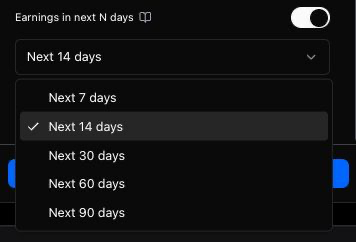
Toggle on a 7, 14, 30, 60, or 90-day earnings window when you want contracts on names reporting soon — the opposite of Exclude Earnings.
What it does
Earnings in next N days keeps only contracts whose underlying reports earnings inside a window you choose (7, 14, 30, 60, or 90 days). Use it when you want names with an upcoming report — for example to plan around IV, avoid writing into a blind spot, or build a shortlist before checking the Earnings Calendar.
This is the opposite mindset from Exclude Earnings, which removes contracts that cross an earnings date.
Where to find it
In the filter drawer (and chips) on both screeners:
Toggle it on, then pick Next 7 / 14 / 30 / 60 / 90 days. Turning it off clears the window.
When to use it
- Pre-earnings planning — see what you already hold or might write before a report week.
- IV / event shortlists — combine with IVR or Volume when you're researching event-driven setups intentionally.
- Calendar workflow — scan here, then confirm dates on the Earnings Calendar.
When NOT to use it
For default wheel income, prefer Exclude Earnings (or leave Earnings in next N days off). Targeting reporters is a deliberate choice, not a beginner default.
Don't enable both "exclude near earnings" styles and this include-window at the same time expecting a huge list — they pull in opposite directions. Pick one intent per scan.
Common mistakes
1. Leaving it on after a one-off scan. Reset to off (or clear the chip) when you go back to ordinary income screening.
2. Trusting the window without verifying the date. Earnings dates can shift. Confirm on the calendar the day you trade.
Where to go next
- Pair with Exclude Earnings so you know both tools.
- Try the Earnings Safe preset when you want the opposite: skip reporters.
Frequently Asked Questions
How is Earnings in next N days different from Exclude Earnings?
Exclude Earnings removes contracts that cross an earnings date (safer default for income). Earnings in next N days keeps only tickers reporting inside your window — use it when you intentionally want upcoming reporters.
Which day windows are available?
Presets are Next 7, 14, 30, 60, and 90 days. Default when you turn the toggle on is typically 14 days.
Should beginners leave this filter on?
No. Beginners should usually leave it off and use Exclude Earnings (or an Earnings Safe preset) so contracts don't span a binary event by accident.