Precision Options Selling: Advanced Tracker Guide with a FREE Google Sheets Template
Master your options selling portfolio with this guide and a FREE Tracker Template. Learn advanced tracking techniques, key metrics, and spreadsheet organization for consistent Wheel Strategy profits.

The options market, with its inherent complexities, demands more than just a basic understanding of strategies. A recent study by the Options Clearing Corporation (OCC) revealed that a significant portion of options traders fail to consistently track their trades, leaving potential profits – and crucial insights – on the table.
Motivation: Why Meticulous Tracking is Crucial
You're already familiar with the Wheel Strategy – but are you truly mastering your portfolio? Are you extracting every ounce of insight from your trades? Or are you just rolling the dice (or the wheel, in this case)? For the sophisticated options trader, simply knowing that you made a profit isn't enough. You need to know why, how, and how to repeat (or avoid) past outcomes. That's where meticulous trade tracking comes in. Now you can DIY your tracking process by quickly empowering yourself and learning to learning to create a solid tracker and master google sheet finance related formulas. Or, if you are time pressed, you can follow this post to leverege a robust system of tracking and use our freebie template to bring the system in practice!
This guide explains how to leverage a set of 5 trackers to build the ultimate system and finally provides THE freebie i.e. a google sheet tracker you can steal duplicate with one-click. Also, consider taking your tracking a step futher with our wheel strategy screener. It will help you find the stocks that can provide you the maximum premium for the wheel strategy.
Organizing Your Options Tracking: A Multi-Sheet Approach
Forget messy spreadsheets crammed onto a single page. A professional options tracking system requires a multi-sheet approach, each serving a distinct purpose. But first,
Note:
- Instructions on how to make a copy are provided towards the bottom of this article. Follow along the article below and use the tracker to make sense as you go.
- The template is populated with mock data to get you started. You can delete the sample data once you get going.
- Disclaimer: This template is provided for informational purposes only and does not constitute financial advice. Trading options and tracking them involves risk and complexity. Feel free to adapt this tool to your needs, but understand the formulas and their limitations.
Now lets get going on a financial control panel for your Wheel Strategy operations. The control panel comprises of these 5 trackers:
- The Stock Watchlist
- The Trade Log
- Performance Summary
- Owned Shares – Managing Your Assignments
- KPI Dashboard
Sheet 1: The Stock Watchlist – Your Potential Universe
This is your pre-trade scouting report. Before you even think about selling an option, you need to identify suitable candidates.

Your watchlist should include:
- Fundamental Analysis Scores: Rate stocks based on financial health, industry leadership, and growth prospects. Don't just rely on gut feeling; develop a quantifiable scoring system (e.g., 1-5).
- Volatility Metrics: Track Implied Volatility (IV) Rank, IV Percentile, and Historical Volatility (HV). This is where you identify opportunities for premium selling. As Warren Buffett famously said, "Volatility is far from synonymous with risk." We want volatility, but we want to understand it.
- Actionable Triggers: Use a dropdown menu to categorize stocks ("Monitor," "Consider CSP," "Consider CC," "Avoid"). This keeps your watchlist dynamic and actionable.
- Notes: Keep tabs of earnings calls, ex-dividend date, any specific analysis you have done on the stock.
Sheet 2: The Trade Log – Your Source of Truth
This is the heart of your tracking system. Every single trade detail goes here, meticulously recorded. No exceptions. Think of it as your trading journal, where you document not just what happened, but why.

Key columns include:
- Date, Ticker, Option Type (CSP/CC), Action (Open/Close/Rollover/Assignment): The basics. No brainer.
- Strike Price, Expiration Date, Contracts: Again, essential data.
- Premium (per contract and total): Track both gross and net premium (after commissions). Small fees add up!
- Underlying Price (at Open and Close): This is crucial for analyzing your entry and exit points. Did you sell a put at the optimal time, or were you chasing premium?
- Outcome: Categorize each trade (e.g., "Win (Premium Collected)," "Loss (Assigned/Closed at Loss)," "Rolled," "Assigned"). This is vital for performance analysis.
- Notes: This is where your qualitative analysis goes. Why did you make this trade? What was your rationale? What did you learn? This is arguably the most important column of all.
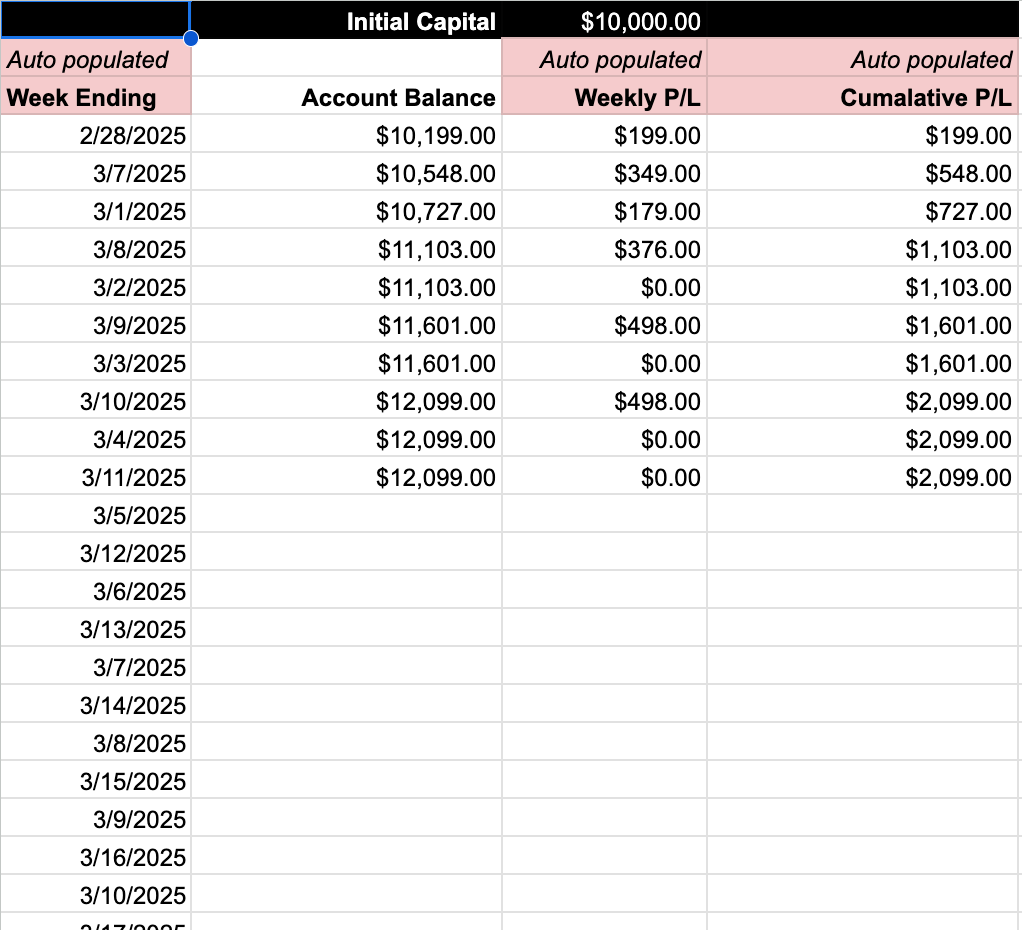
Sheet 3: Performance Summary – Your Financial Dashboard
This sheet transforms your raw trade data into actionable insights. It's where you see the big picture, track your progress, and identify areas for improvement.
Sheet 4: Owned Shares – Managing Your Assignments
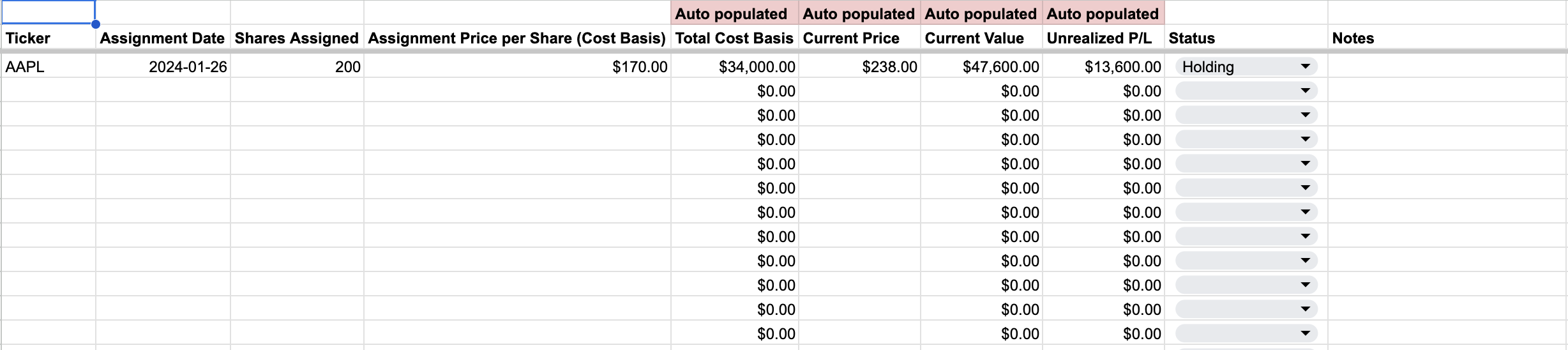
If you're actively running the Wheel Strategy, you will get assigned shares at some point. This sheet helps you manage those shares and track your cost basis, unrealized gains/losses, and your strategy for those shares (holding, selling covered calls, etc.).
Sheet 5: Key Performance Indicators (KPIs) Dashboard
And FINALLY! Your fully auto populated KPI dashboard.
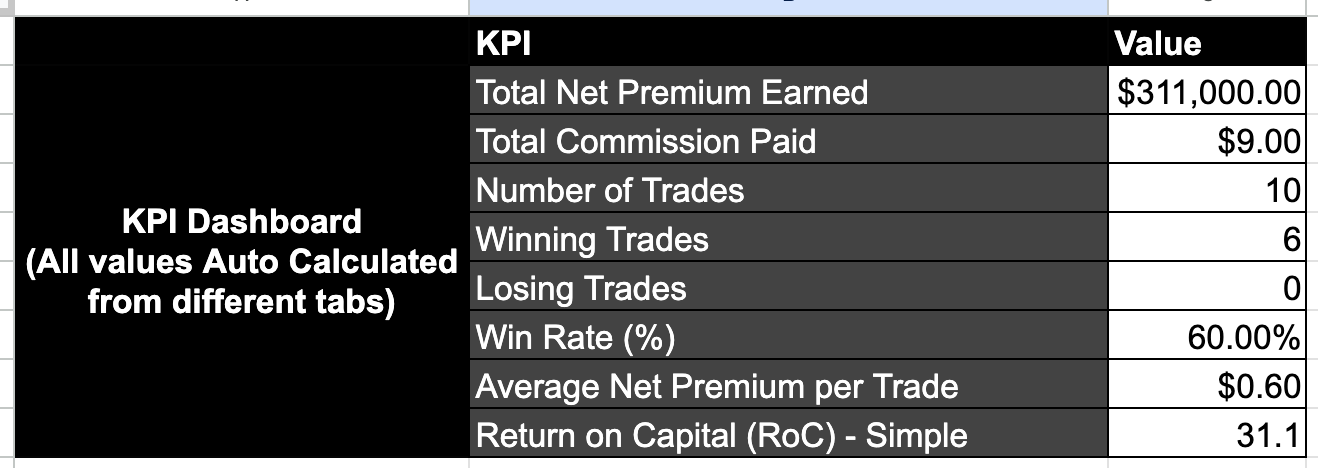
- Total Net Premium Earned: The bottom line. Are you making money?
- Total Commission Paid: The hidden cost of trading. Are you over-trading?
- Number of Trades/Winning Trades/Losing Trades: Quantifies your activity and success rate.
- Win Rate (%): A key measure of your strategy's effectiveness.
- Average Net Premium per Trade: Are your trades consistently profitable, or are you relying on a few big wins?
- Return on Capital (RoC): This one is tricky with the Wheel Strategy, as your capital allocation changes. A simplified approach is to calculate RoC based on the cash secured for puts or the value of shares covered for calls. For a more advanced (and accurate) RoC, you would need to track the time each trade is open and the capital tied up in each trade.
Advanced Considerations for the Serious Trader
- Time Decay Tracking: While not explicitly a column, understanding how theta (time decay) is working in your favor is crucial. Consider adding notes on how quickly premium is eroding, especially as you approach expiration.
- Rolling Strategy: Document your rolling decisions (rolling out, up, or down). Why did you roll? What were the costs/benefits?
- Risk Management Parameters: Define your risk tolerance before you enter a trade. How much capital are you willing to allocate to a single trade? What's your maximum loss threshold? Document these rules and stick to them.
- Paper Trading: Consider adding a column to your sheet to denote if the trade was a real money trade, or a "paper trade". This can be very useful to track the profitability of various strategies and see how your emotions and decision making process change when real money is on the line.
Putting it All Together: Free Wheel Strategy Options Tracker v1
To help you implement this comprehensive tracking system, I've created a detailed Google Sheet template. You can access it here: Free Wheel Strategy Options Tracker v1. Make sure you go through the Read Me FIRST tab.
To use the spreadsheet for yourself, follow these simple steps:
- Open the link in your browse
- Sign in to your Google Account
- If you do not have a Google account, you can download it by clicking on the File menu -> Download -> Microsoft Excel
- If you have signed into your google account, click on "File" in the top-left corner.
- Select "Make a copy." This will create a personal copy of the spreadsheet in your own Google Drive that you can edit.
- Start entering your data and feel organized!
Fine-Tuning Your Approach: Continuous Improvement
Tracking your trades isn't a one-time setup; it's an ongoing process. Regularly review your Performance Summary sheet. Look for patterns. Are you consistently making the same mistakes? Are certain stocks more profitable for you than others? Use this data to refine your strategy and improve your results. The goal is not just to track, but to learn.
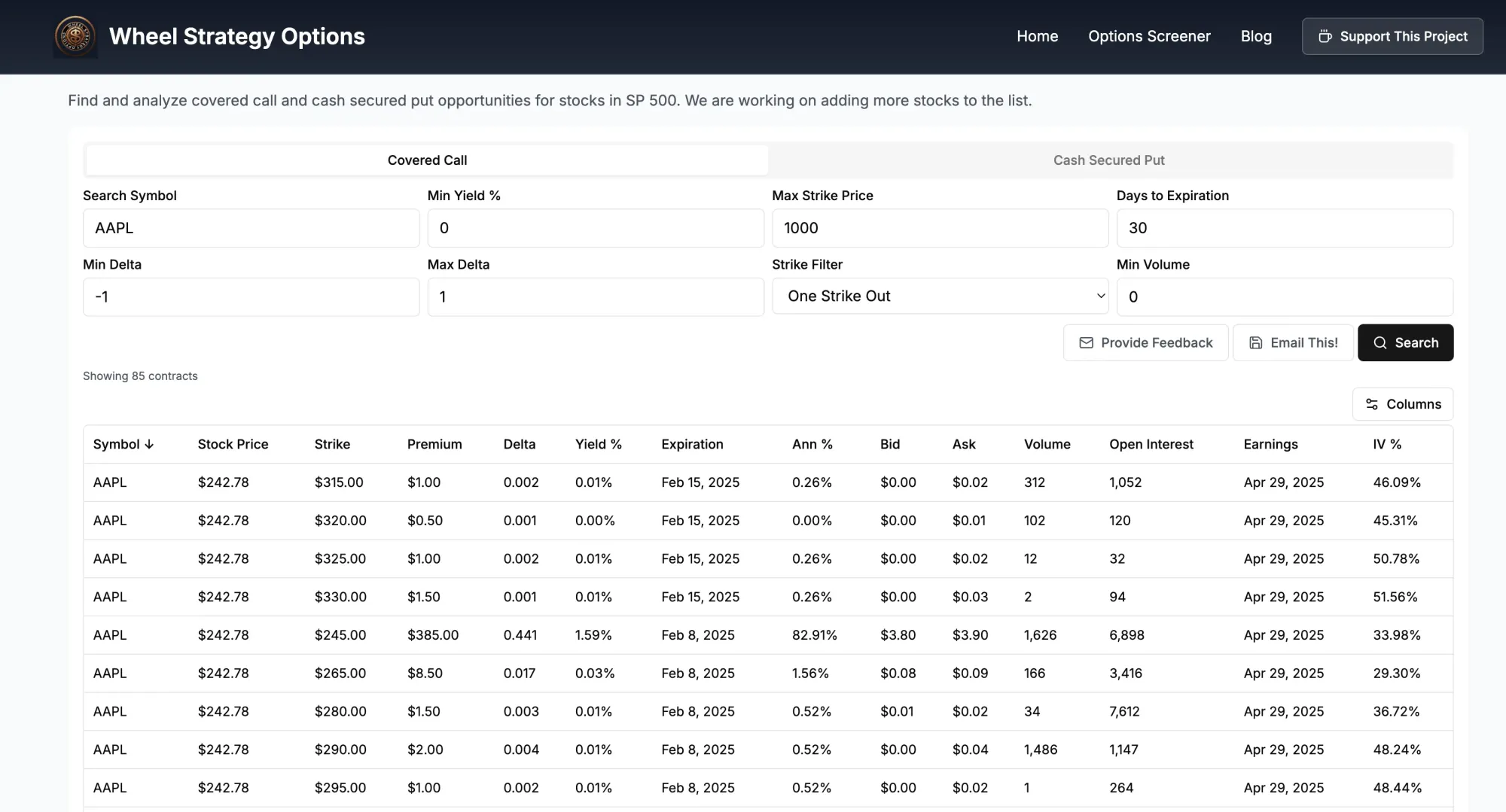
Consider taking your tracking a step futher with our wheel strategy screener. It will help you find the stocks that can provide you the maximum premium for the wheel strategy.
Key Takeaways
- Meticulous trade tracking is essential for consistent profitability in options selling.
- Organize your tracking using a multi-sheet approach: Watchlist, Trade Log, Performance Summary, and Owned Shares.
- Track not just what happened, but why. Document your rationale and learning points.
- Focus on key performance indicators (KPIs) to measure your progress and identify areas for improvement.
- Continuously review and refine your strategy based on your tracking data.
Tell us in the comments if you found this useful. We are open to suggestions for making this better - let us know your feedback!
This blog post is for informational purposes only and should not be considered financial advice. Trading options involves risk of loss. Conduct thorough research and consult with a qualified financial advisor before making any investment decisions.
Follow us on:
Threads | X (Twitter) | Reddit | Instagram


Comments ()