Wheel Strategy Spreadsheet vs Trade Tracker: When to Use Each (2026)
A wheel spreadsheet works until assignments and rolls pile up. Here is how to decide between Sheets and a dedicated tracker — plus a six-step migration path.
Quick answer: A Google Sheets wheel log is fine for your first handful of trades and for modeling scenarios you fully control. Switch to a dedicated wheel strategy tracker when assignments, rolls, and adjusted cost basis start eating your Sunday afternoon — or when you want broker sync instead of re-typing fills. Most active sellers use both for a while: Sheets for planning, the tracker for the live book.
This is educational content, not financial advice. Options involve risk; size positions to your account and comfort level.
If you sell cash-secured puts and covered calls, you already know the tracking problem. One put turns into shares. You sell a call. You roll it twice. Premium lowers your basis, but only if you logged every leg correctly. Three months later you are staring at a tab full of rows wondering whether KO is actually profitable.
Reddit threads and YouTube demos push two defaults: a free spreadsheet template or a purpose-built app. Both can work. The mistake is treating them as interchangeable when they solve different headaches at different stages of your wheel.
What a wheel spreadsheet actually has to track
A usable wheel log is more than a list of trades. At minimum you need columns for symbol, leg type (CSP or CC), open date, expiration, strike, contracts, premium collected, fees, status (open, assigned, rolled, closed), and notes. That gets you a journal.
To run the full wheel cycle, the sheet also needs logic for adjusted cost basis. When a put assigns, your share entry is strike minus put premium (minus fees). When you sell a covered call, each call premium further lowers effective basis. Rolls should stay tied to the original trade so you can answer “what did I actually make on this name?” without reconstructing history from broker screenshots.
Many templates add summary tabs: monthly premium income, win rate, open positions, and per-symbol P&L. That is where spreadsheet authors earn their keep — IF formulas stay correct after every assignment and roll.
We publish a Google Sheets wheel template for sellers who want that structure without building it from scratch. It is a solid starting point. It is not magic: you still enter every fill, fix typos, and update status cells when something assigns.
Where spreadsheets break down (even good ones)
Spreadsheets fail quietly. The pain shows up in four places wheel sellers hit repeatedly:
- Assignment math. One mistyped premium on an assigned put corrupts every covered call basis line that follows. Fixing it means tracing dependent cells — easy to miss one.
- Roll chains. A roll is not a new trade; it is a continuation. In Sheets that usually means manual linking (parent row IDs, notes, or duplicate symbol tabs). Break the chain once and your win-rate tab lies.
- Multiple accounts. Taxable, IRA, and a separate broker each need isolation. Tabs multiply. Summary formulas get fragile.
- Time cost. Reconciling broker exports every week across ten open positions is 20–40 minutes you are not spending on strike selection.
None of this means spreadsheets are bad. It means they scale poorly with wheel-specific state changes — the exact transitions a generic options journal ignores.
Spreadsheet vs tracker: decision table
Use this table as a default. Your book size and tolerance for manual entry matter more than ideology.
| Your situation | Spreadsheet | Trade tracker |
|---|---|---|
| Learning the wheel, <5 logged trades | Best fit — low setup, you learn the mechanics | Optional — fine if you prefer apps over cells |
| Regular seller, assignments + rolls monthly | Doable but error-prone on basis | Best fit — wheel-aware math |
| 10+ open positions across tickers | Summary tabs get brittle | Best fit — portfolio view |
| Multiple brokerage accounts | Separate tabs + manual rollup | Best fit — portfolios per account |
| Want broker auto-import | CSV paste weekly | Best fit — connect brokers; up to 5 years history on Ultra |
| Custom what-if modeling | Best fit — change any assumption | Use calculator + screener for singles |
| Tax export / raw data ownership | Best fit — you own the file | CSV export supported; data portable |
When a Google Sheets template is still the right call
Stay on Sheets (or keep a parallel sheet) when:
- You are still learning leg structure. Typing each field teaches what delta, DTE, and assignment mean in your own account.
- You trade rarely. One CSP a month on a name you would own anyway? A single tab and a calculator is enough.
- You want full control of formulas. Custom tax lots, dividend adjustments, or non-standard rolls are easier in a sheet you built.
- You are offline or broker-agnostic. Sheets works anywhere; no login required for the log itself.
Our existing Sheets guide walks through columns, premium yield, and monthly income rollups. Pair it with the covered call screener or CSP screener when you are picking the next leg — then paste the trade into the sheet.
When a dedicated wheel strategy tracker earns its keep
A tracker built for the wheel — not a generic trading journal — automates the parts spreadsheets handle badly:
- Assignment flow: Mark a CSP assigned and the system moves you into shares with updated basis without re-deriving formulas.
- Roll linking: Rolls stay attached to the opening trade so per-symbol history reads as one story.
- Portfolio stats: Premium collected, realized P&L, win rate, and open legs on one screen — the numbers you actually check before selling again.
- Per-symbol drill-down: Open AAPL and see every put, assignment, call, and roll on that ticker.
The Wheel Strategy Options Trade Tracker is built around the put → assignment → covered call loop. Logging is free; you can import CSV or start from the Sheets template instead of re-keying history.
Sellers with a full book often tell us the switch happened after their first bad assignment week — three symbols assigned the same Friday, two rolls on Monday, and a basis column that no longer matched the broker.
Inside the Trade Tracker: features spreadsheets mimic badly
Words only go so far. Here is what wheel-aware tracking looks like once you move off a grid of cells.
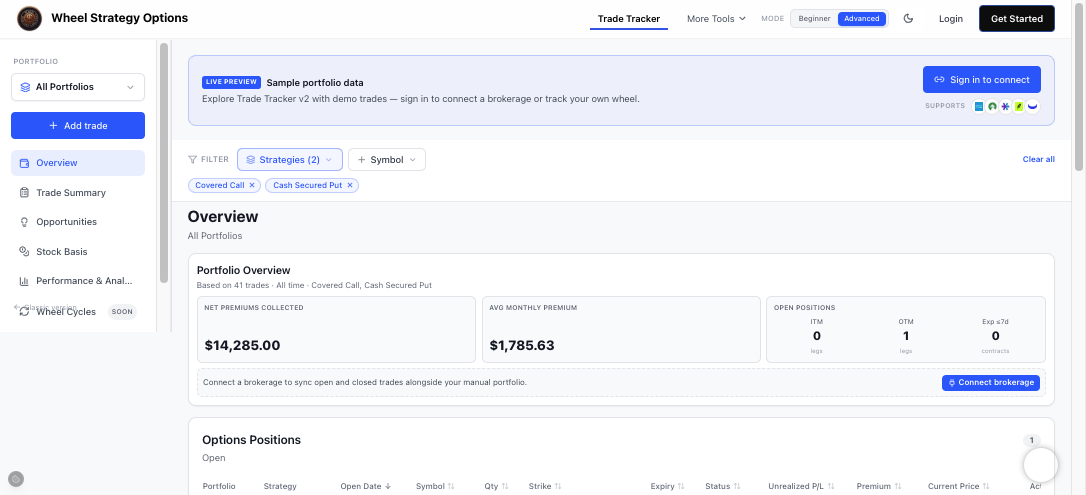
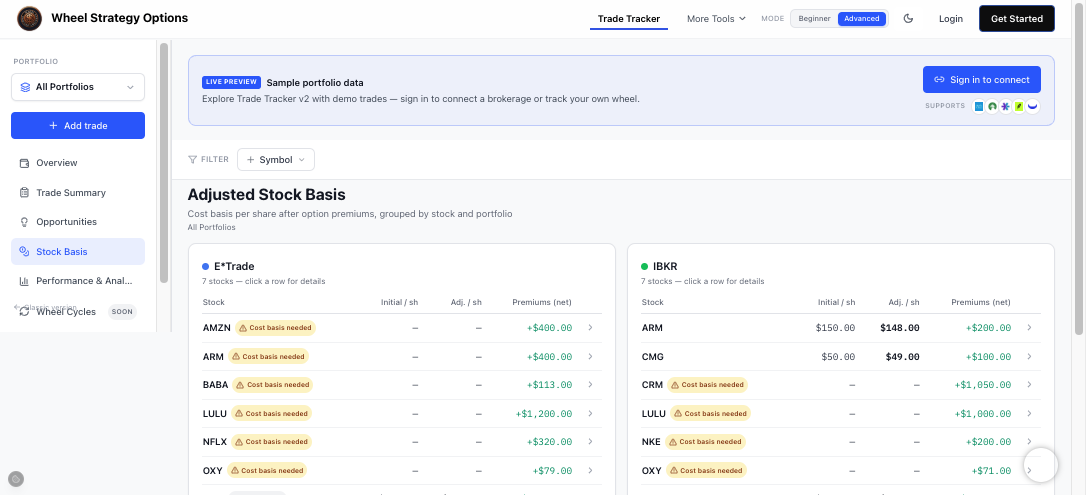
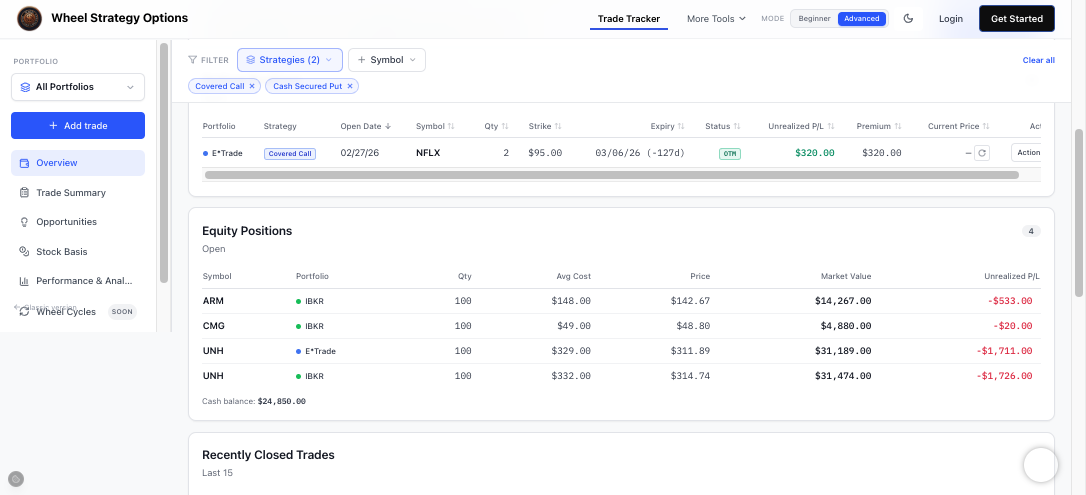
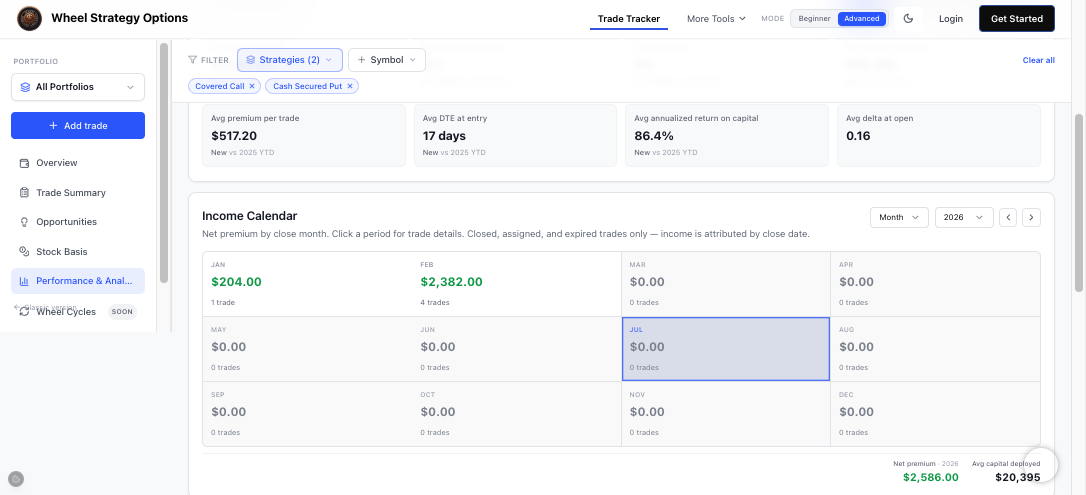
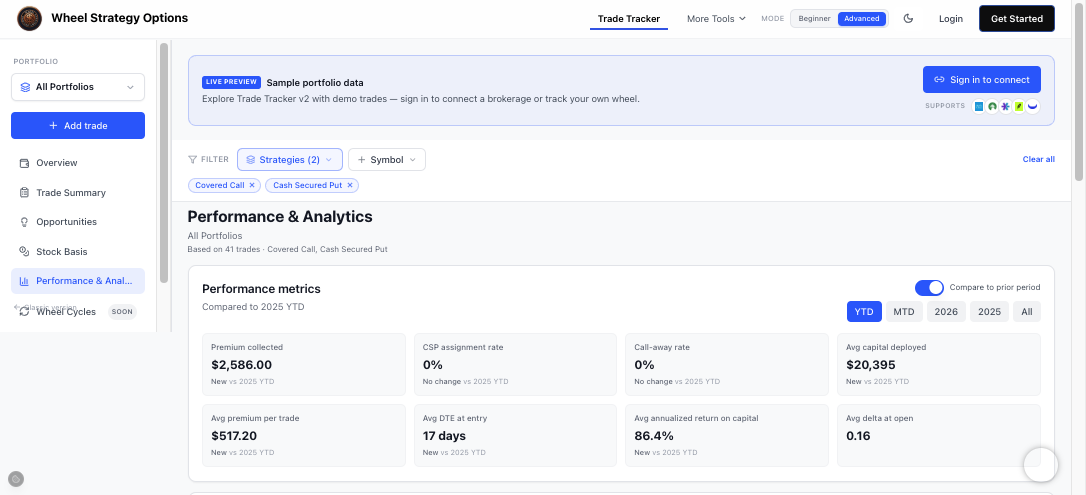
Want a guided tour? The Trade Tracker course walks through each screen with the same screenshots.
Broker sync vs manual entry
Manual entry (spreadsheet or tracker) gives you full control and works with any broker. The cost is discipline: every fill logged within a day or two.
Broker connect pulls transactions from supported accounts so you spend less time reconciling. On WSS, SnapTrade powers connections to brokers including Robinhood, Schwab, Fidelity, Webull, tastytrade, and Interactive Brokers. See the full list on Supported brokers.
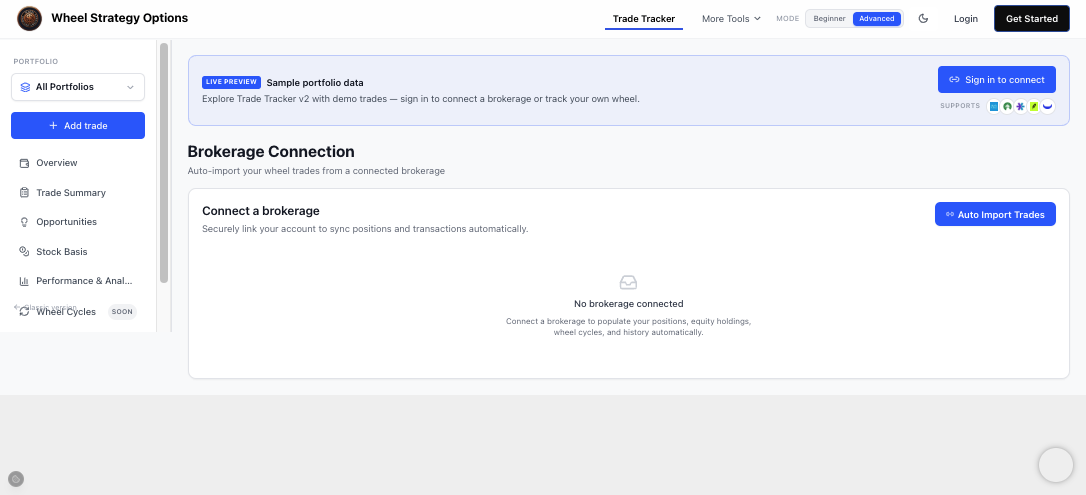
When you connect, you pick how much history to import: up to 2 years on Pro and up to 5 years on Ultra (subject to what your broker returns). That means you can backfill years of CSPs, assignments, and covered calls instead of typing them from old statements. Ultra users can also expand the import window later from Sync now if they upgrade after connecting.
Sync is not set-and-forget. You still review imported legs — especially rolls, assignments, and same-day spreads — before they affect basis. Think of sync as fast capture, not autopilot.
If you are privacy-first or trade through a broker not yet supported, CSV import into the tracker or a sheet remains the practical path. Export from your broker monthly at minimum.
Worked example: one wheel cycle in both tools
Suppose you sell a 30-delta CSP on a $50 stock: 1 contract, 21 DTE, $1.20 premium ($120 before fees).
In a spreadsheet, you add a row: open date, expiry, strike $50, premium $120, status Open. You might add a column for break-even if assigned ($48.80 before fees). The stock closes below $50 at expiry. You update status to Assigned, add a shares row at effective basis $48.80, and sell a covered call at the $52 strike for $0.95 ($95). Another row. Basis drops again. If you roll that call for a $0.40 net credit, you add a roll note and link rows manually.
In the tracker, you log the CSP once. On assignment, you mark it assigned; shares and basis update automatically. The covered call attaches to the same symbol thread. A roll stays linked to the original CSP chain. Portfolio premium and P&L refresh without touching formulas.
Same economics, different maintenance. One cycle is trivial in either tool. Ten overlapping cycles across six tickers is where the tracker pulls ahead.
| Task | Spreadsheet effort | Tracker effort |
|---|---|---|
| Log new CSP | One row, check formulas | One form or import line |
| Put assigns | Update status + basis cells + shares tab | Mark assigned; basis auto-updates |
| Roll covered call | New row + link to parent manually | Roll action; chain preserved |
| Monthly premium total | SUMIF on date column | Dashboard / income view |
| “Am I up on this symbol?” | Filter rows + verify math | Symbol page P&L |
How to migrate from Sheets to the tracker (six steps)
You do not need a big-bang cutover. Most sellers run parallel for two weeks.
- Export or copy open positions from your sheet — symbol, leg, strike, expiry, premium, status.
- Import via CSV or use the Sheets template import path documented in our tracker guide.
- Reconcile assignments first. Fix any assigned puts before adding new calls so basis matches your broker.
- Connect broker (optional) on Supported brokers to backfill history — up to 2 years on Pro or up to 5 years on Ultra — instead of manual CSV for every old fill.
- Log new trades in the tracker only for 14 days. Keep the sheet read-only as backup.
- Retire duplicate summary tabs once portfolio totals match broker statements within rounding.
Keep the sheet for scenario modeling if you like — “what if I roll to next month at $0.50?” — but let the tracker own the live book.
Spreadsheet-only tools vs an integrated wheel platform
Standalone tracker apps (OptionWheelTracker, CoveredWheel, OptionIncome, and others) focus on logging. That is their job. WSS combines tracking with live screeners, IV tools, and earnings context so the loop is find → log → review → find again without tab sprawl.
If you only need a journal, any wheel-aware tracker beats a generic Excel grid. If you already screen on WSS, keeping trades in the same account means one login for Discover, IV Rank, and your open positions.
FAQ
What is the best wheel strategy tracker?
There is no universal winner — it depends on whether you want broker sync, spreadsheet import, or screener integration. For wheel-specific assignment and roll handling, pick a tool that models the full CSP → shares → CC cycle, not a generic stock journal. Try logging one assigned put and one roll before committing; that workflow separates wheel trackers from plain options logs.
Can I track the wheel in Google Sheets?
Yes. Many sellers run years on Sheets, especially with a structured template. You will manually maintain basis on assignment, link rolls, and build summary tabs. It works until position count and roll frequency make errors costly. Our Sheets template guide is the fastest start if you want to stay in Google Docs.
How do I import spreadsheet trades into a tracker?
Export your sheet to CSV with consistent column names (symbol, type, date, strike, premium, status). The WSS Trade Tracker accepts CSV import and can ingest from the same Google Sheets layout as our public template. Import closed history first, then open positions, then verify totals against one broker statement before you delete sheet rows. Or skip the manual export entirely: connect your brokerage and import up to five years of transactions on Ultra (two years on Pro).
Should I use a spreadsheet or app if I am just starting?
Start with whichever lowers friction. If you like seeing formulas, use Sheets for your first five trades. If you know assignments will stack quickly, start in the tracker and skip rebuilding formulas later. Either way, log every leg the day it opens — the tool matters less than the habit.
Next step: Open the Trade Tracker, import one symbol from your sheet or broker CSV, and compare basis to your broker. Still prefer Sheets? Grab our Google Sheets template and pair it with the covered call screener for the next leg.
Comments ()